How to Build the Ultimate Claude OCR Skill for Thumbnails, Carousels & Infographics (2026 Guide)
Claude’s Skills feature allows you to package reusable workflows that Claude AI can load on demand. If you frequently need to extract text from images - such as YouTube thumbnails, social media carousels, or complex infographics - writing the same OCR (Optical Character Recognition) prompts repeatedly is highly inefficient.
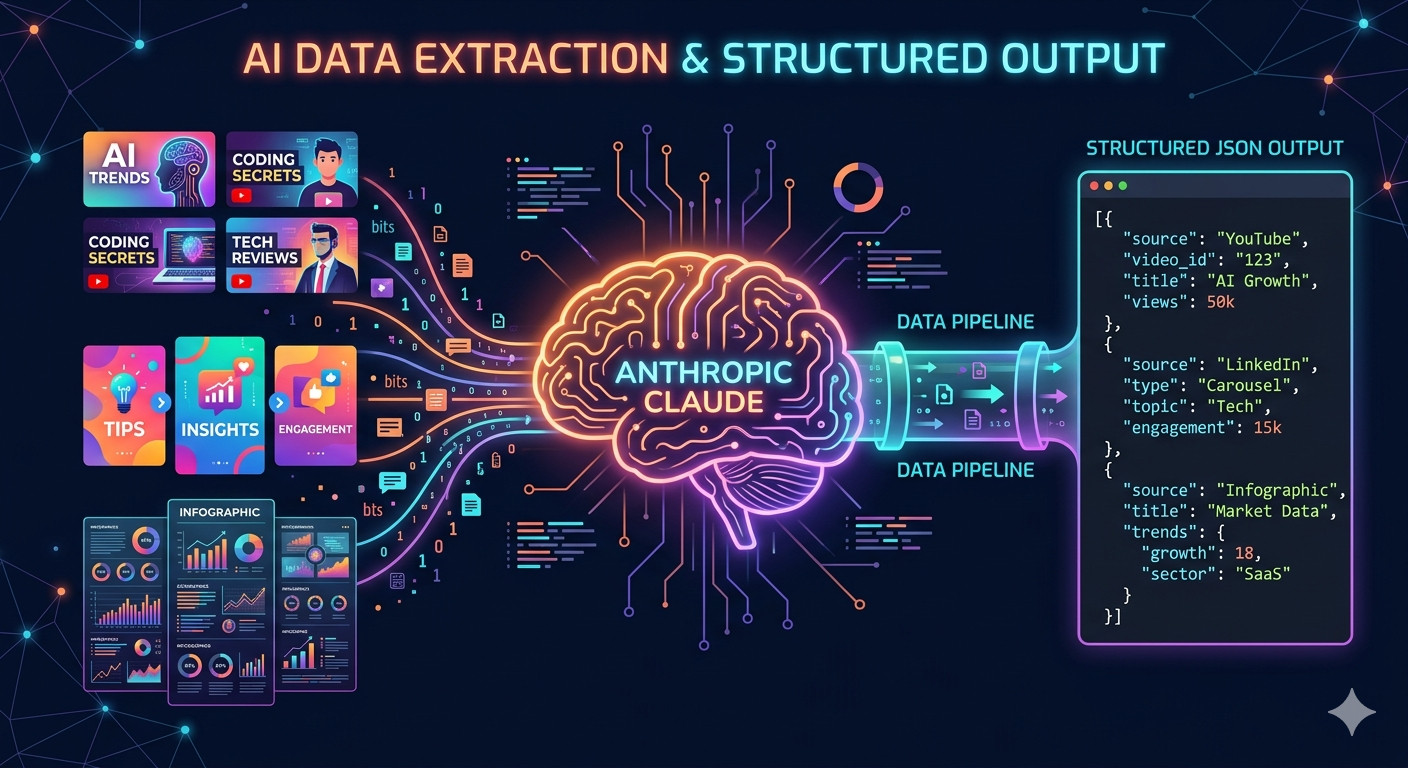
In this comprehensive 2026 guide, we will build a custom Claude OCR Skill that leverages the ocrskill API to automatically extract text from visual content and format it into strictly typed JSON. By the end of this tutorial, you’ll have a fully functional automated pipeline capable of processing three high-value visual formats: YouTube and social thumbnails, multi-slide social carousels, and data-heavy infographics.
What Are Custom Claude Skills?
Claude Skills are modular capability packages that extend what Claude AI can do. Each skill resides in a directory with a SKILL.md file containing metadata, instructions, and optional scripts or templates. Claude automatically discovers these skills based on their description and loads them only when relevant. This means you pay zero context token costs for installed skills until they are actually triggered.
The architecture relies on progressive disclosure:
- Level 1 - Metadata: Always loaded. Contains just the skill name and description (~100 tokens).
- Level 2 - Instructions: Loads when the skill is triggered. The body of
SKILL.mdenters the active context window. - Level 3 - Resources: Loaded on demand. Python scripts, prompt templates, and reference files are read from the filesystem as needed.
This flexible architecture allows you to bundle a comprehensive Claude OCR workflow with multiple extraction scripts and reference schemas without bloating your everyday conversational context.
Why Build a Dedicated Claude OCR Skill?
If your workflow involves asking Claude to extract text from screenshots, YouTube thumbnails, or LinkedIn slide decks, you are likely rewriting the exact same extraction instructions every time. A dedicated Claude OCR skill solves this inefficiency by permanently encoding:
- The optimal API call format for a high-accuracy OCR service like ocrskill.
- Content-specific extraction prompts tailored for thumbnails, carousels, or infographics.
- A secondary AI structuring step that precisely maps raw OCR markdown to a strict JSON schema.
- Built-in error handling and retry logic within a bundled Python script.
Once installed, you simply drop an image into a Claude chat and type “extract this.” Your custom skill handles the entire image-to-text and structuring pipeline autonomously.
Skill Directory Structure
A well-organized directory is crucial for a maintainable skill. We’ll use the following structure:
ocrskill-ocr/
├── SKILL.md
├── scripts/
│   ├── extract.py
│   ├── structure.py
│   └── schemas.py
The SKILL.md file holds metadata and instructions. The scripts/ directory contains the core logic: text extraction, JSON structuring, and a schemas.py module defining Pydantic models for each content type. Using Pydantic ensures runtime validation and provides automatic JSON Schema generation for the OpenAI Structured Outputs API.
Step 1: Create the SKILL.md Configuration File
Every skill begins with a SKILL.md file. The YAML frontmatter dictates when Claude should activate the skill, while the markdown body provides step-by-step execution instructions.
---
name: ocrskill-ocr
description: Extract text from thumbnails, carousels, and infographics using the ocrskill API and structure the output as typed JSON. Use when the user provides an image and asks for OCR, text extraction, or content analysis of visual media.
dependencies: openai, pydantic>=2.0
---

# ocrskill OCR Skill

## Overview

This skill converts visual content into structured data using a two-step pipeline:

1. **Extract**  -  Send the image to the ocrskill API and receive clean markdown.
2. **Structure**  -  Pass the markdown to a secondary model that maps it to a rigid JSON schema.

## When to Use

Activate this skill when the user:
- Uploads a thumbnail, carousel slide, or infographic.
- Asks to "extract," "transcribe," or "OCR" an image.
- Requests structured data from a visual asset.

## Supported Content Types

| Type | Description | Pydantic Model |
|------|-------------|----------------|
| thumbnail | YouTube/social video thumbnails with title text, channel names, view counts | `ThumbnailSchema` |
| carousel | Multi-slide social media carousels (Instagram, LinkedIn) | `CarouselSchema` |
| infographic | Data-heavy visuals with stats, charts, and callouts | `InfographicSchema` |

## Instructions

1. Determine the content type from the user's uploaded image. If unclear, ask for clarification.
2. Run `scripts/extract.py` with the image file to obtain raw markdown text.
3. Run `scripts/structure.py` using the markdown and the appropriate matching schema.
4. Return both the raw markdown and the structured JSON payload to the user.

## Environment

Requires `openai` and `pydantic` Python packages, alongside a valid `OCRSKILL_API_KEY` environment variable.
SEO Tip: The description field is the most critical line. Claude reads it at startup to determine skill relevance. Be highly specific - include keywords like “OCR,” “extract text,” “thumbnails,” and “infographics” to ensure reliable matching.
Step 2: Define Pydantic Schemas for Structured Output
Rather than managing raw JSON schema files, we define Pydantic models in a single schemas.py module. This approach provides robust runtime validation, automatic JSON Schema generation, and a superior developer experience with type checking.
scripts/schemas.py
from pydantic import BaseModel

class ThumbnailSchema(BaseModel):
    title: str
    channel_name: str
    view_count: int | None = None
    duration: str | None = None
    badge_text: str | None = None
    overlay_text: list[str] = []

class CarouselSchema(BaseModel):
    slide_number: int
    heading: str | None = None
    body_text: str
    cta_text: str | None = None
    hashtags: list[str] = []
    mentions: list[str] = []

class InfographicStat(BaseModel):
    label: str
    value: str

class InfographicSection(BaseModel):
    heading: str
    stats: list[InfographicStat] = []
    body_text: str | None = None

class InfographicSchema(BaseModel):
    title: str
    subtitle: str | None = None
    sections: list[InfographicSection]
    source_attribution: str | None = None

SCHEMAS = {
    "thumbnail": ThumbnailSchema,
    "carousel": CarouselSchema,
    "infographic": InfographicSchema,
}
Notice how the InfographicSchema is intentionally nested. Infographics often feature multiple sections containing distinct headings and statistics. A flat schema would lose this crucial visual hierarchy. Pydantic naturally models this nested structure, keeping the generated JSON schema perfectly in sync.
Step 3: Build the OCR Image Text Extraction Script
Our extraction script will call the ocrskill API utilizing the familiar OpenAI SDK format. It accepts an image path or URL and prints cleanly formatted markdown to stdout.
import sys
import base64
import os
from openai import OpenAI

client = OpenAI(
    base_url="https://api.ocrskill.com/v1",
    api_key=os.environ["OCRSKILL_API_KEY"],
)

PROMPTS = {
    "thumbnail": (
        "Convert this video thumbnail to markdown. "
        "Preserve the title text, channel name, view count, duration, "
        "and any overlay text or badges exactly as they appear."
    ),
    "carousel": (
        "Convert this carousel slide to markdown. "
        "Preserve the heading, body text, calls to action, hashtags, "
        "and any mentions exactly as they appear."
    ),
    "infographic": (
        "Convert this infographic to markdown. "
        "Preserve the title, all section headings, every statistic with its label, "
        "body text, and source attribution exactly as they appear. "
        "Use markdown headings to reflect the visual hierarchy."
    ),
}

def extract(image_source: str, content_type: str) -> str:
    prompt = PROMPTS.get(content_type, PROMPTS["infographic"])

    if image_source.startswith("http"):
        image_content = {"type": "image_url", "image_url": {"url": image_source}}
    else:
        with open(image_source, "rb") as f:
            b64 = base64.b64encode(f.read()).decode()
        ext = image_source.rsplit(".", 1)[-1].lower()
        mime = {"png": "image/png", "jpg": "image/jpeg", "jpeg": "image/jpeg",
                "webp": "image/webp", "gif": "image/gif"}.get(ext, "image/png")
        image_content = {"type": "image_url", "image_url": {"url": f"data:{mime};base64,{b64}"}}

    response = client.chat.completions.create(
        model="ocrskill-v1",
        messages=[{
            "role": "user",
            "content": [
                {"type": "text", "text": prompt},
                image_content,
            ],
        }],
    )
    return response.choices[0].message.content

if __name__ == "__main__":
    image_path = sys.argv[1]
    ctype = sys.argv[2] if len(sys.argv) > 2 else "infographic"
    print(extract(image_path, ctype))
Why Content-Specific Prompts Matter: A YouTube thumbnail prompt asking for “section headings and statistics” will confuse the OCR output. Tailoring prompts to the specific visual structure of each content type significantly improves text extraction accuracy.
Step 4: Build the JSON Structuring Script
The structuring script takes the raw markdown from step one and maps it to our Pydantic model using a secondary AI model. This separation of concerns is the exact two-step pattern utilized in our automated competitor ad analysis pipeline - ocrskill handles the high-fidelity image-to-text conversion, while a fast general-purpose LLM handles semantic structuring.
By setting the OpenAI Structured Outputs API response_format to our Pydantic model’s JSON schema, we guarantee clean, parsable data every time - eliminating the need for fragile json.loads try/except blocks.
import sys
import json
import os
from openai import OpenAI
from schemas import SCHEMAS

llm_client = OpenAI(api_key=os.environ.get("OPENAI_API_KEY", ""))

def structure(markdown: str, content_type: str) -> dict:
    schema_cls = SCHEMAS[content_type]
    json_schema = schema_cls.model_json_schema()

    response = llm_client.chat.completions.create(
        model="gpt-5-mini",
        messages=[
            {
                "role": "system",
                "content": (
                    "You convert OCR markdown into a JSON object matching the provided schema. "
                    "Use null for fields not present in the markdown. Do not invent data."
                ),
            },
            {
                "role": "user",
                "content": f"OCR Markdown:\n{markdown}",
            },
        ],
        response_format={
            "type": "json_schema",
            "json_schema": {
                "name": content_type,
                "schema": json_schema,
                "strict": True,
            }
        },
    )
    # Validate the raw string response using Pydantic
    return schema_cls.model_validate_json(response.choices[0].message.content).model_dump()

if __name__ == "__main__":
    markdown_input = sys.stdin.read()
    ctype = sys.argv[1] if len(sys.argv) > 1 else "infographic"
    result = structure(markdown_input, ctype)
    print(json.dumps(result, indent=2))
(Note: The code above uses the standard chat.completions.create format with response_format for structured outputs).
When Claude runs this skill, it automatically pipes the stdout of extract.py directly into the stdin of structure.py. This keeps each component of your pipeline isolated and independently testable.
Step 5: Package and Install Your Claude OCR Skill
To deploy, package the skill directory as a ZIP file and upload it directly to Claude.
cd ocrskill-ocr/
zip -r ../ocrskill-ocr.zip .
Next, navigate to Customize > Skills within the Claude interface, click the “+” button, select “Upload a skill,” and upload your newly created ZIP file. The skill will appear in your skill list, ready to be toggled on.
For Claude Code users: You can simply drop the ocrskill-ocr/ directory into ~/.claude/skills/ (for personal use) or .claude/skills/ (for project-level access), and Claude will discover it automatically.
How to Use the Claude OCR Skill
Once successfully installed, the skill activates automatically whenever you provide an image and mention text extraction. Try these natural language prompts:
- “Extract the text from this YouTube thumbnail.”
- “OCR this LinkedIn carousel slide and give me structured JSON.”
- “Pull all the statistics and data from this infographic.”
Claude will intelligently read the SKILL.md, determine the correct content type, execute the extraction script against the ocrskill API, and subsequently run the structuring script. You receive both the raw markdown transcript and the perfectly typed JSON payload.
Batch Processing Multiple Images
For batch processing, you can command Claude to iterate over an entire directory of images:
“I have 30 social media carousel slides in
/screenshots/campaign-q1/. Extract and structure each one as acarouseltype. Save the final results to a single JSON array.”
Claude will autonomously loop through the folder, invoke the skill’s scripts for each image, and aggregate the extracted data.
Handling Multi-Slide Social Media Carousels
Social media carousels require special handling because a single cohesive post spans multiple separate images. Our skill processes each slide independently but returns an array of structured objects, preserving the critical slide order.
import asyncio
from extract import extract
from structure import structure

async def process_carousel(slide_paths: list[str]) -> list[dict]:
    results = []
    for i, path in enumerate(slide_paths, start=1):
        markdown = extract(path, "carousel")
        data = structure(markdown, "carousel")
        data["slide_number"] = i
        results.append(data)
    return results
If you require faster processing, you can wrap the extraction calls in asyncio.to_thread to execute them concurrently, bypassing the blocking nature of the synchronous OpenAI SDK.
Pro Tips for Optimizing Your Claude OCR Skill
- Prompt Precision is Key: The prompt engineering inside
extract.pydictates your final quality. If the OCR frequently misses overlay text on thumbnails, refine the prompt: “Include all text rendered on top of the image, paying special attention to small text in corners and subtle watermarks.” - Schema Evolution is Cheap: Because we decoupled OCR extraction from JSON structuring, you can add new fields to your Pydantic model without ever needing to re-process the original images.
- Test Independently: Always run
extract.pyon a sample image and verify the raw markdown before attempting to debug the JSON structuring. Flawed extraction cannot be fixed by clever JSON schemas. - Offload Heavy Lifting to ocrskill: The ocrskill API runs on highly optimized Nvidia GPU infrastructure, returning precise text in under 500ms. Relying solely on standard multimodal LLM vision for text-dense infographics is significantly slower and highly prone to hallucination.
Conclusion: Automating Image Text Extraction with Claude
By building and installing this custom Claude Skill, you’ve created a permanent, highly reusable OCR pipeline that lives directly inside your AI assistant:
- Thumbnails: Instantly parsed into titles, channel names, view counts, and overlays.
- Carousel Slides: Accurately extracted into per-slide headings, body copy, and hashtags.
- Infographics: Perfectly structured into hierarchical sections with accurately labeled data points.
The raw markdown provides a verifiable audit trail, while the structured JSON is immediately ready to be ingested into dashboards, databases, or downstream automation workflows. Build it once, and never type out a manual OCR prompt again.
The complete claude skill package is here: https://gitlab.com/ocrskill/claude-skill feel free to check it out
git clone https://gitlab.com/ocrskill/claude-skill.git ocrskill-ocr
cd ocrskill-ocr/
ls -l